


最近把邮箱换成 PMail 了,因为足够小巧,虽然各个邮件客户端支持还不够友好,但也足够用了。
搭建 PMail 还废了我不少功夫,起初我以为就写一个 docker-compose.yaml,再配置一下 DNS 就 OK 了
结果都配好了,收也收不到,发也发不出去!!!
我就来回翻 README 文档,检查 SELinux, 检查防火墙,检查安全组,貌似都没问题。
iptables、telnet、nmap 命令都试了一个遍,还是不行,再翻翻 issues,发现必须要放行 25 端口,结果我所有端口都试了,就没试 25 端口,VPS 厂商禁用了 25 端口,最后换了一家 VPS,就 OK 了。
我不是一个合格的运维了。
总体用起来还是很舒服的,项目自带了 telegram 插件,但是很久没有更新了,有时侯看不见邮件正文,就很难受,就想着自己改改,看了看文档,还挺简单的,主要是定义一个结构体,实现 framework.EmailHook 接口就可以了。
type DemoPlugin struct {}
var _ framework.EmailHook = (*DemoPlugin)(nil)
// GetName 获取插件名称
func (w *DemoPlugin) GetName(ctx *context.Context) string {
return "DemoPlugin"
}
// SettingsHtml 返回插件设置页面的html
func (w *DemoPlugin) SettingsHtml(ctx *context.Context, url string, requestData string) string {
return ""
}
// SendBefore 邮件发送前调用
func (w *DemoPlugin) SendBefore(ctx *context.Context, email *parsemail.Email) {
}
// SendAfter 邮件发送后调用
func (w *DemoPlugin) SendAfter(ctx *context.Context, email *parsemail.Email, err map[string]error) {
}
// ReceiveParseBefore 收信解析前调用
func (w *DemoPlugin) ReceiveParseBefore(ctx *context.Context, email *[]byte) {
}
// ReceiveParseAfter 收信解析后调用
func (w *DemoPlugin) ReceiveParseAfter(ctx *context.Context, email *parsemail.Email) {
}再看看源码,就可以改了。
初始化配置
// config.go
const (
// PMail 主配置文件
MAIN_CONFIG_FILE = "./config/config.json"
// Telegram 推送插件配置,不想与主配置文件搞混,单独新建一个配置文件
PLUGIN_CONFIG_FILE = "./config/pmail_telegram_push_config.json"
)
// 插件配置文件
type PluginConfig struct {
TelegramBotToken string `json:"telegram_bot_token"`
TelegramChatID string `json:"telegram_chat_id"`
}
type Config struct {
PluginConfig *PluginConfig
MainConfig *pconfig.Config // 主要是从主配置文件获取到网页版地址,其实也可以在插件配置文件里写,但少点配置少出错
}
// 读取主配置文件
func readMainConfig() *pconfig.Config {
content, err := os.ReadFile(MAIN_CONFIG_FILE)
if err != nil {
panic(err)
}
var mainConfig pconfig.Config
if err := json.Unmarshal(content, &mainConfig); err != nil {
panic(err)
}
return &mainConfig
}
// 读取插件配置文件
func readPluginConfig() *PluginConfig {
content, err := os.ReadFile(PLUGIN_CONFIG_FILE)
if err != nil {
panic(err)
}
var pluginConfig PluginConfig
if err := json.Unmarshal(content, &pluginConfig); err != nil {
panic(err)
}
if pluginConfig.TelegramBotToken == "" || pluginConfig.TelegramChatID == "" {
panic("telegram bot token or chat id is empty")
}
return &pluginConfig
}
func ReadConfig() *Config {
return &Config{
PluginConfig: readPluginConfig(),
MainConfig: readMainConfig(),
}
}编写插件
// hook.go
type PmailTelegramPushHook struct {
chatId string
bot *bot.Bot
httpsEnabled int
webDomain string
}
var _ framework.EmailHook = (*PmailTelegramPushHook)(nil)
...
func NewPmailTelegramPushHook(cfg *config.Config) *PmailTelegramPushHook {
bot, err := NewBot(cfg)
if err != nil {
panic(err)
}
return &PmailTelegramPushHook{
chatId: cfg.PluginConfig.TelegramChatID,
bot: bot,
httpsEnabled: cfg.MainConfig.HttpsEnabled,
webDomain: cfg.MainConfig.WebDomain,
}
}原项目使用 http post 请求直接发送的消息,我找到了两个库:
第一个太久没跟新了,所以选用了第二个,然后我就发现可以加入更多的配置项了
type PluginConfig struct {
    // 机器人 Token
    TelegramBotToken string `json:"telegram_bot_token"`
    // 聊天 ID
    TelegramChatID   string `json:"telegram_chat_id"`
    // 显示正文内容
    ShowContent      bool   `json:"show_content" default:"true"`
    // 开启防剧透模式
    SpoilerContent   bool   `json:"spoiler_content" default:"true"`
    // 发送附件
    SendAttachment   bool   `json:"send_attachment" default:"true"`
    // 开启调试模式
    Debug            bool   `json:"debug" default:"false"`
    // 使用代理,虽然国外不需要,但国内呢,国内不放 25 端口,好吧!
    Proxy            string `json:"proxy" default:""`
    // 超时时间
    Timeout          int    `json:"timeout" default:"30"`
}
接下来开始创建机器人了
package hook
import (
"context"
"net"
"net/http"
"net/url"
"strings"
"time"
"github.com/go-telegram/bot"
"github.com/ydzydzydz/pmail_telegram_push/config"
"golang.org/x/net/proxy"
)
func NewBot(config *config.Config) (*bot.Bot, error) {
opts := []bot.Option{
bot.WithCheckInitTimeout(time.Duration(config.PluginConfig.Timeout) * time.Second),
}
// 开启调试模式
if config.PluginConfig.Debug {
opts = append(opts, bot.WithDebug())
}
if config.PluginConfig.Proxy == "" {
return newBotWithOutProxy(config, opts...)
}
parsedURL, err := url.Parse(config.PluginConfig.Proxy)
if err != nil {
panic(err)
}
switch strings.ToLower(parsedURL.Scheme) {
case "socks5":
return newBotWithSocks5Proxy(config, parsedURL, opts...)
case "http", "https":
return newBotWithHTTPProxy(config, parsedURL, opts...)
default:
return newBotWithOutProxy(config, opts...)
}
}
// 不使用代理
func newBotWithOutProxy(config *config.Config, options ...bot.Option) (*bot.Bot, error) {
return bot.New(config.PluginConfig.TelegramBotToken, options...)
}
// 使用 Socks5 代理
func newBotWithSocks5Proxy(config *config.Config, proxyURL *url.URL, options ...bot.Option) (*bot.Bot, error) {
var auth *proxy.Auth
if proxyURL.User != nil {
password, _ := proxyURL.User.Password()
auth = &proxy.Auth{
User: proxyURL.User.Username(),
Password: password,
}
}
dialer, err := proxy.SOCKS5(
"tcp",
proxyURL.Host,
auth,
proxy.Direct,
)
if err != nil {
return nil, err
}
httpClient := &http.Client{
Transport: &http.Transport{
DialContext: func(ctx context.Context, network, addr string) (net.Conn, error) {
return dialer.Dial(network, addr)
},
},
}
opts := append(options, bot.WithHTTPClient(time.Duration(config.PluginConfig.Timeout)*time.Second, httpClient))
return bot.New(config.PluginConfig.TelegramBotToken, opts...)
}
// 使用 HTTP 代理
func newBotWithHTTPProxy(config *config.Config, proxyURL *url.URL, options ...bot.Option) (*bot.Bot, error) {
httpClient := &http.Client{
Transport: &http.Transport{
Proxy: http.ProxyURL(proxyURL),
},
}
options = append(options, bot.WithHTTPClient(time.Duration(config.PluginConfig.Timeout)*time.Second, httpClient))
return bot.New(config.PluginConfig.TelegramBotToken, options...)
}使用机器人发送消息
// send.go
// 消息底部按钮
func (h *PmailTelegramPushHook) getWebButton() *models.InlineKeyboardMarkup {
var url string
if h.httpsEnabled > 1 {
url = "http://" + h.webDomain
} else {
url = "https://" + h.webDomain
}
return &models.InlineKeyboardMarkup{
InlineKeyboard: [][]models.InlineKeyboardButton{
{
{
Text: "查收邮件",
URL: url,
},
},
},
}
}
// 使用正则删除 HTML 标签,虽然 Telegram 支持一部分比 HTML 标签,
// 但是要写一个超级复杂的正则也太麻烦了,干脆全部替换了,
// 注意要替换成空格,不然内容就粘连在一起了,不易读,如果是多个链接,都没法点
func removeHTMLTags(text string) string {
re := regexp.MustCompile("<.*?>")
return re.ReplaceAllString(text, " ")
}
// Telegram 消息有长度限制,防止溢出可能需要截一下
const TEXT_MAX_SIZE = 4096
// 生成获取需要发送的文本消息
func (h *PmailTelegramPushHook) getText(email *parsemail.Email) (text string) {
text = "📧 有新邮件\n"
text += fmt.Sprintf("🔖 主题:<b>%s</b>\n", email.Subject)
text += fmt.Sprintf("📤 发件:<%s>\n", email.From.EmailAddress)
if len(email.To) > 0 {
text += "📥 收件:"
for _, to := range email.To {
text += fmt.Sprintf("<%s> ", to.EmailAddress)
}
text += "\n"
}
if len(email.Cc) > 0 {
text += "📋 抄送:"
for _, cc := range email.Cc {
text += fmt.Sprintf("<%s> ", cc.EmailAddress)
}
text += "\n"
}
if len(email.Bcc) > 0 {
text += "🕵️ 密送:"
for _, bcc := range email.Bcc {
text += fmt.Sprintf("<%s> ", bcc.EmailAddress)
}
text += "\n"
}
if len(email.Attachments) > 0 {
text += fmt.Sprintf("📎 附件:%d 个\n", len(email.Attachments))
}
// 生成邮件正文内容
if h.pluginConfig.ShowContent {
size := TEXT_MAX_SIZE - len(text) - 100
if size <= 0 {
log.Warnf("text size too large: %s", text)
return
}
var emailContent string
if len(email.Text) > 0 {
if len(email.Text) > size {
emailContent = fmt.Sprintf("%s...", string(email.Text[:size]))
} else {
emailContent = string(email.Text)
}
} else if len(email.HTML) > 0 {
// 原项目只发送纯文本消息,所以有时看不到正文,这里对 HTML 正文做了简单处理
if len(email.HTML) > size {
emailContent = fmt.Sprintf("%s...", removeHTMLTags(string(email.HTML))[:size])
} else {
emailContent = removeHTMLTags(string(email.HTML))
}
}
// 开启防剧透模式就是添加一对标签
if len(emailContent) > 0 && h.pluginConfig.SpoilerContent {
emailContent = fmt.Sprintf("<tg-spoiler>%s</tg-spoiler>", emailContent)
}
if len(emailContent) > 0 {
text += fmt.Sprintf("%s\n", emailContent)
}
}
return
}
// 发送消息,返回响应
func (h *PmailTelegramPushHook) sendNotification(email *parsemail.Email) (msg *models.Message, err error) {
ctx, cancel := context.WithTimeout(context.Background(), time.Duration(h.pluginConfig.Timeout)*time.Second)
defer cancel()
parmas := &bot.SendMessageParams{
ChatID: h.pluginConfig.TelegramChatID,
Text: h.getText(email),
ParseMode: models.ParseModeHTML,
ReplyMarkup: h.getWebButton(),
// 配置是否显示链接预览,有时候挺讨厌的,我喜欢关掉
LinkPreviewOptions: &models.LinkPreviewOptions{
IsDisabled: &h.pluginConfig.DisableLinkPreview,
},
}
return h.bot.SendMessage(ctx, parmas)
}
// 发送附件,引用上一条消息,传入上一条消息 ID 即可
func (h *PmailTelegramPushHook) sendAttachments(id int, email *parsemail.Email) (msg *models.Message, err error) {
ctx, cancel := context.WithTimeout(context.Background(), time.Duration(h.pluginConfig.Timeout)*time.Second)
defer cancel()
params := &bot.SendDocumentParams{
ChatID: h.pluginConfig.TelegramChatID,
ReplyParameters: &models.ReplyParameters{
MessageID: id,
// 这里只引用上一条消息的关键字,而非整条消息
Quote: fmt.Sprintf("📎 附件:%d 个", len(email.Attachments)),
},
}
// 这里遍历附件发送消息,不够优雅,但是合并发送我没写明白,我需要大佬支持一下
for i, attachment := range email.Attachments {
params.Caption = fmt.Sprintf("📎 附件 %d", i+1)
params.Document = &models.InputFileUpload{
Filename: filepath.Base(attachment.Filename),
Data: bytes.NewReader(attachment.Content),
}
if msg, err = h.bot.SendDocument(ctx, params); err != nil {
err = errors.Join(err, fmt.Errorf("send document failed, err: %w", err))
continue
}
}
return
}
// TODO: 合并多个附件为一个消息发送
// 没想明白,为啥不行?
// func (h *PmailTelegramPushHook) sendAttachmentsCombine(id int, email *parsemail.Email) (msg []*models.Message, err error) {
// ctx, cancel := context.WithTimeout(context.Background(), time.Duration(h.pluginConfig.Timeout)*time.Second)
// defer cancel()
// params := &bot.SendMediaGroupParams{
// ChatID: h.pluginConfig.TelegramChatID,
// ReplyParameters: &models.ReplyParameters{
// MessageID: id,
// Quote: fmt.Sprintf("📎 附件:%d 个", len(email.Attachments)),
// },
// }
// for i, attachment := range email.Attachments {
// params.Media = append(params.Media, &models.InputMediaDocument{
// Media: filepath.Base(attachment.Filename),
// Caption: fmt.Sprintf("📎 附件 %d", i+1),
// MediaAttachment: bytes.NewReader(attachment.Content),
// })
// }
// return h.bot.SendMediaGroup(ctx, params)
// }调用 send.go 发送邮件通知
// hook.go
const (
PLUGIN_NAME = "pmail_telegram_push"
)
type PmailTelegramPushHook struct {
chatId string
bot *bot.Bot
httpsEnabled int
webDomain string
showContent bool
sendAttachment bool
spoilerContent bool
timeout time.Duration
}
var _ framework.EmailHook = (*PmailTelegramPushHook)(nil)
func (h *PmailTelegramPushHook) GetName(ctx *context.Context) string {
return PLUGIN_NAME
}
func (h *PmailTelegramPushHook) ReceiveSaveAfter(ctx *context.Context, email *parsemail.Email, ue []*models.UserEmail) {
for _, u := range ue {
// 管理员,未读消息,发送通知
if u.UserID == 1 && u.IsRead == 0 && u.Status == 0 && email.MessageId > 0 {
msg, err := h.sendNotification(email)
if err != nil {
log.Errorf("send notification failed, err: %v", err)
continue
}
// 有附件,引用上一条消息发送附件
if h.sendAttachment && len(email.Attachments) > 0 {
if _, err = h.sendAttachments(msg.ID, email); err != nil {
log.Errorf("send attachments failed, err: %v", err)
} else {
log.Infof("send attachments success, message id: %d", msg.ID)
}
}
}
}
}
func (h *PmailTelegramPushHook) ReceiveParseBefore(ctx *context.Context, email *[]byte) {}
func (h *PmailTelegramPushHook) ReceiveParseAfter(ctx *context.Context, email *parsemail.Email) {}
func (h *PmailTelegramPushHook) SendAfter(ctx *context.Context, email *parsemail.Email, err map[string]error) {}
func (h *PmailTelegramPushHook) SendBefore(ctx *context.Context, email *parsemail.Email) {}
func (h *PmailTelegramPushHook) SettingsHtml(ctx *context.Context, url string, requestData string) string {return ""}
func NewPmailTelegramPushHook(cfg *config.Config) *PmailTelegramPushHook {
bot, err := NewBot(cfg)
if err != nil {
panic(err)
}
return &PmailTelegramPushHook{
chatId: cfg.PluginConfig.TelegramChatID,
bot: bot,
httpsEnabled: cfg.MainConfig.HttpsEnabled,
webDomain: cfg.MainConfig.WebDomain,
showContent: cfg.PluginConfig.ShowContent,
sendAttachment: cfg.PluginConfig.SendAttachment,
spoilerContent: cfg.PluginConfig.SpoilerContent,
timeout: time.Duration(cfg.PluginConfig.Timeout) * time.Second,
}
}好了,最后一步
// main.go
func main() {
    config := config.ReadConfig()
    framework.CreatePlugin(
        hook.PLUGIN_NAME,
        hook.NewPmailTelegramPushHook(config),
    ).Run()
}
运行插件
GOOS=linux GOARCH=amd64 go build -o pmail_telegram_push
scp pmail_telegram_push [email protected]:/root/docker/pmail/plugins
ssh [email protected]
cd /root/docker/pmail
vim config/pmail_telegram_push_config.json
docker-compose down
docker-compose up -d
# 发一封邮件测试一下(带附件的,嗯,不带也可以)
// config/pmail_telegram_push_config.json
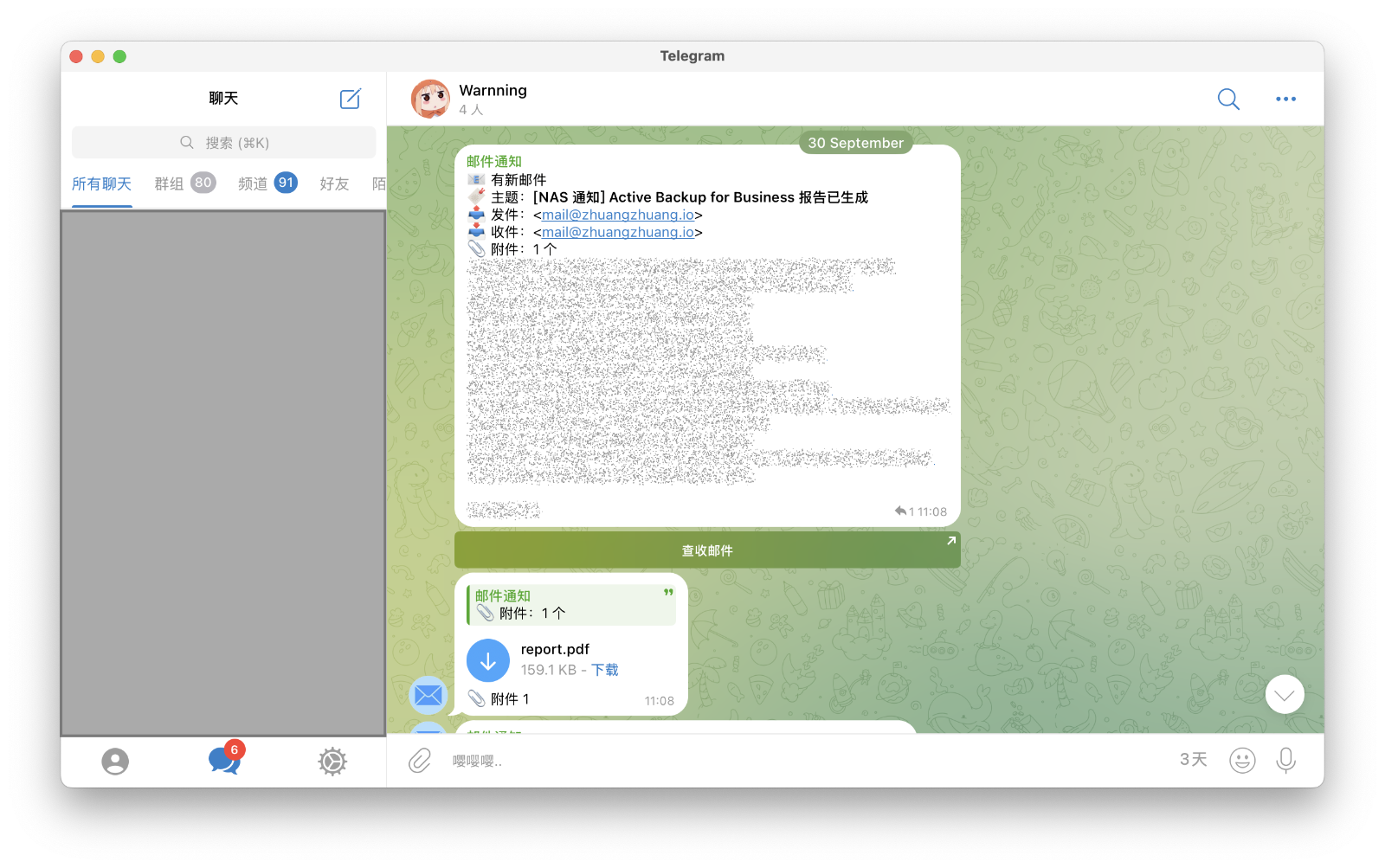
{
"telegram_bot_token": "YOUR_TELEGRAM_BOT_TOKEN",
"telegram_chat_id": "YOUR_TELEGRAM_CHAT_ID",
"show_content": true,
"spoiler_content": true,
"send_attachment": true,
"debug": false,
"proxy": "",
"timeout": 30
}
设置页面
其实现在主要功能都 OK 了, 也没有必要又设置页面,就放一个说明文档吧
// hook.go
import (
_ "embed"
)
//go:embed setting.html
var SettingHtml string
func (h *PmailTelegramPushHook) SettingsHtml(ctx *context.Context, url string, requestData string) string {
return SettingHtml
}重新编译运行 OK 了,emmm,这画的也太丑了,而且还有点问题,Pmail 设置页面是通过 iframe 嵌入插件设置页面的,高度不够,展示不全,不会前端,问问 AI 吧
.png)
function adjustIframeHeight() {
try {
const iframe = window.frameElement;
if (!iframe) return;
const height = Math.max(
document.body.scrollHeight,
document.body.offsetHeight,
document.documentElement.clientHeight,
document.documentElement.scrollHeight,
document.documentElement.offsetHeight
);
iframe.style.height = height + 'px';
} catch (e) {
console.error('调整 iframe 高度失败:', e);
}
}
window.addEventListener('load', adjustIframeHeight);
const observer = new MutationObserver(adjustIframeHeight);
observer.observe(document.body, {
attributes: true,
childList: true,
subtree: true,
characterData: true
});
window.addEventListener('resize', adjustIframeHeight);重新编译,运行,现在 OK 了,还是丑
pnpm create vue@latest
pnpm install vite-plugin-singlefile // 打包成单个文件
pnpm install unplugin-vue-markdown markdown-it-prism prism @unhead/vue -D
pnpm install highlight.js -D
pnpm install github-markdown-css
// vite.config.js
import { fileURLToPath, URL } from 'node:url'
import { defineConfig } from 'vite'
import vue from '@vitejs/plugin-vue'
import vueDevTools from 'vite-plugin-vue-devtools'
import { viteSingleFile } from 'vite-plugin-singlefile'
import Markdown from 'unplugin-vue-markdown/vite'
// https://vite.dev/config/
export default defineConfig({
plugins: [
vue({
include: [/\.vue$/, /\.md$/],
}),
vueDevTools(),
viteSingleFile(),
Markdown(),
],
resolve: {
alias: {
'@': fileURLToPath(new URL('./src', import.meta.url)),
},
},
build: {
outDir: 'hook/dist', // 打包输出文件为 hook/dist/index.html
},
})<!-- src/App.vue -->
<script setup>
import Readme from '../README.md'
import 'github-markdown-css'
import './resize.js'
</script>
<template>
<div class="markdown-body container">
<Readme />
</div>
</template>
<style scoped>
.container {
max-width: 800px;
margin: 0 auto;
}
</style>// hook.go
//go:embed dist/index.html
var SettingHtml stringpnpm build
go build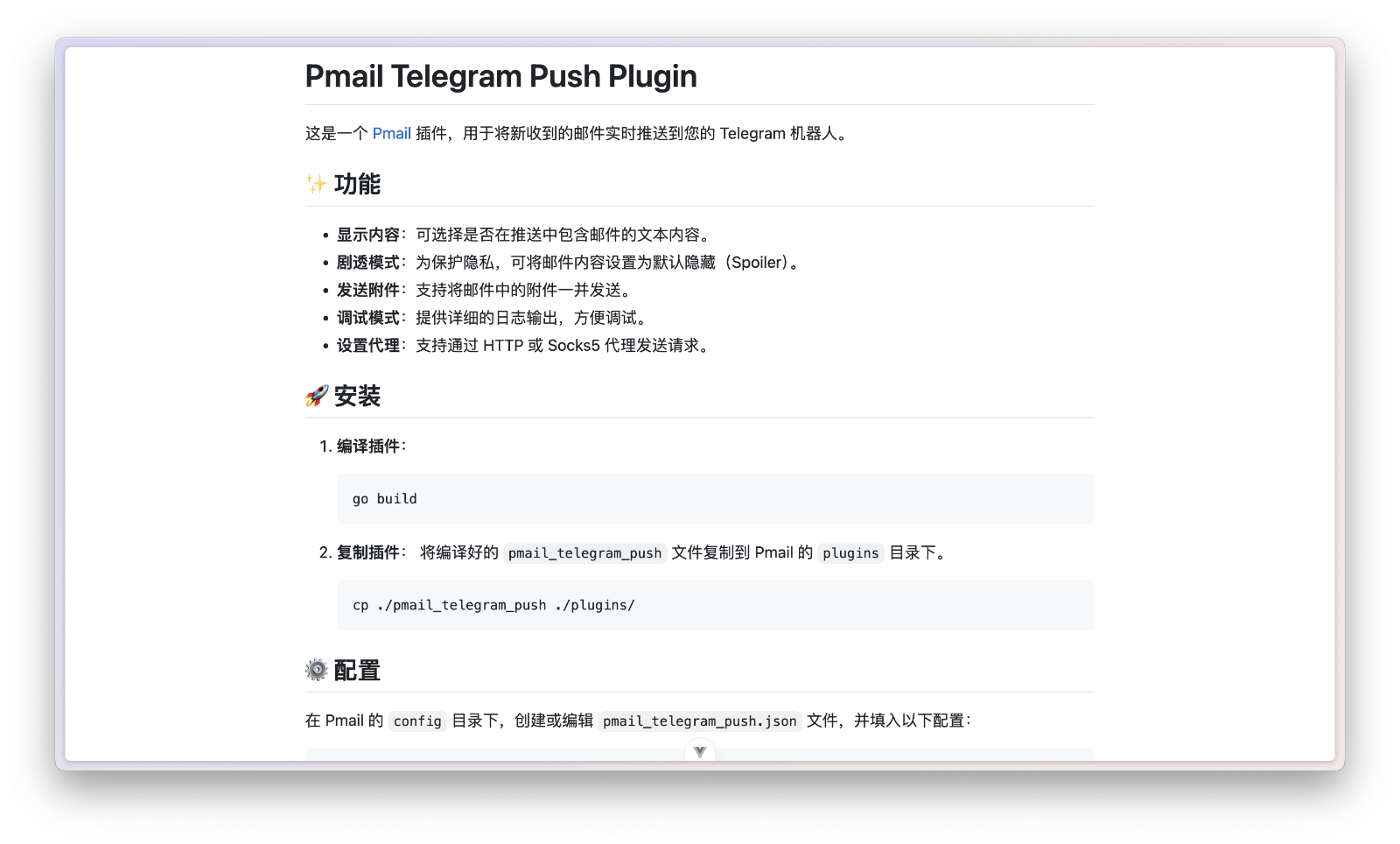
自动化
# .github/workflows/release.yaml
name: Release Binary
on:
push:
tags:
- 'v*'
jobs:
build:
strategy:
matrix:
goos: ['linux', 'darwin', 'windows']
goarch: ['amd64', 'arm64']
runs-on: ubuntu-latest
steps:
- name: Checkout code
uses: actions/checkout@v4
- name: Set up Go
uses: actions/setup-go@v5
with:
go-version: '>=1.25'
- name: Set up Node.js
uses: actions/setup-node@v4
with:
node-version: '24'
- name: Set up pnpm
uses: pnpm/action-setup@v4
with:
version: '10'
run_install: true
standalone: true
- name: Download dependencies
run: |
go mod tidy
go mod download
- name: Build binary
run: |
pnpm build
if [[ "${{ matrix.goos }}" = "windows" ]]; then
go build -o pmail_telegram_push_${{ matrix.goos }}_${{ matrix.goarch }}.exe -ldflags="-s -w"
else
go build -o pmail_telegram_push_${{ matrix.goos }}_${{ matrix.goarch }} -ldflags="-s -w"
fi
env:
GOOS: ${{ matrix.goos }}
GOARCH: ${{ matrix.goarch }}
CGO_ENABLED: 0 # 这里有坑,不关闭 CGO 是动态链接的...
- name: Publish Release
uses: ncipollo/release-action@v1
with:
allowUpdates: true
artifactErrorsFailBuild: true
artifacts: 'pmail_telegram_push_${{ matrix.goos }}_${{ matrix.goarch }}*'
commit: ${{ github.sha }}
draft: false
prerelease: false
token: ${{ secrets.GITHUB_TOKEN }}git tag v0.0.1 # 打标签
git push --tags # 触发 workflow 自动编译 release编写 Makefile
.PHONY: build
build:
pnpm build
go build -o pmail_telegram_push -ldflags "-s -w"
install:
cp -v pmail_telegram_push ./plugins
clean:
rm -vf pmail_telegram_push ./plugins/pmail_telegram_pushmake && make install好了,该有的功能都有了,麻雀虽小,五脏俱全 🤣
项目链接
PMail Telegram 推送插件(一)
本文采用 CC BY-NC-SA 4.0 许可协议,转载请注明出处。

赞赏支持
如果觉得文章对你有帮助,可以请作者喝杯咖啡 ☕
评论交流
欢迎留下你的想法